Sean Ren Product Designer, AI Experiences

Enter passcode

This portfolio is shared by invitation.

Skip to the chapters

Vibe codingPainting and codeFall 2026

Unfinished

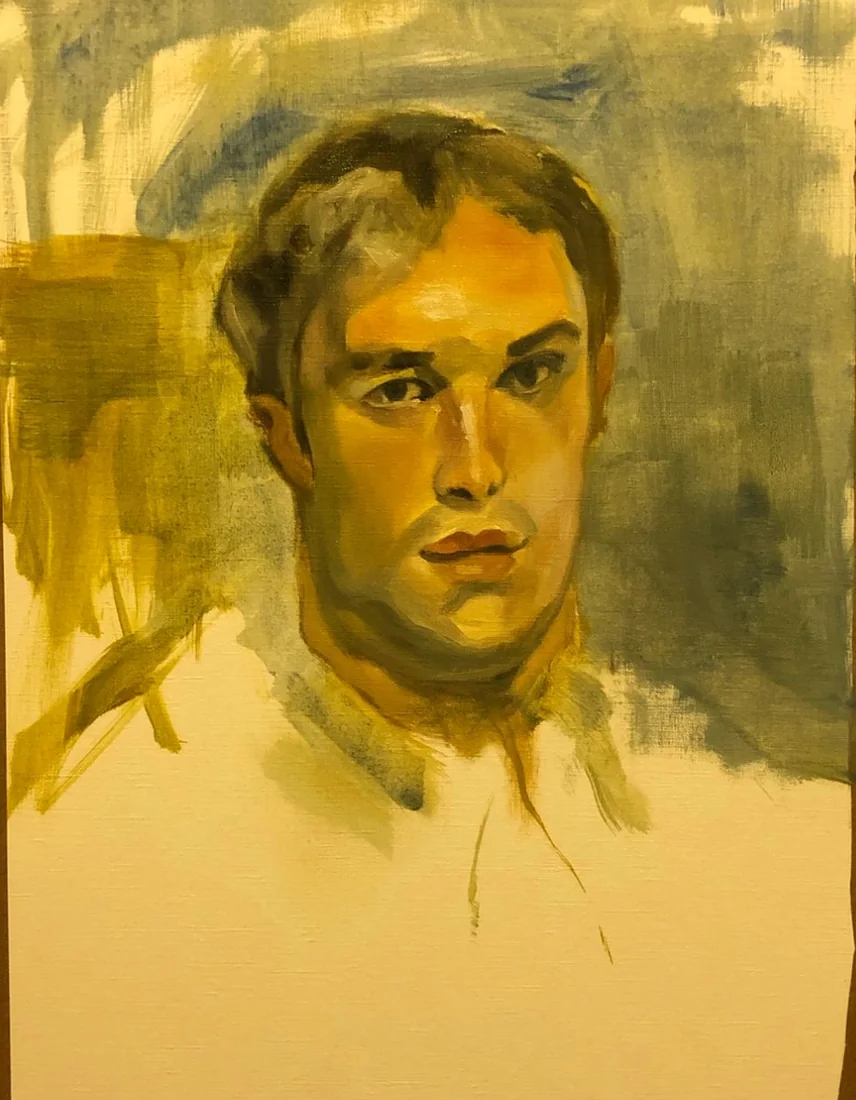
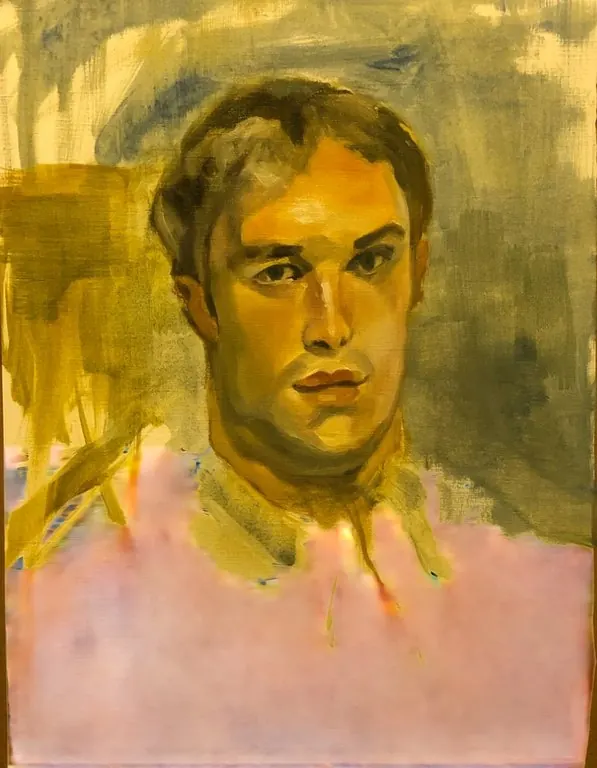
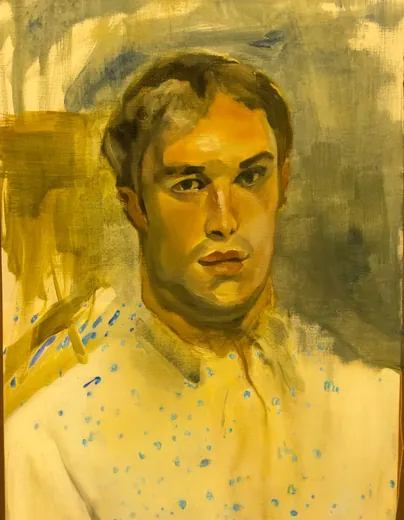
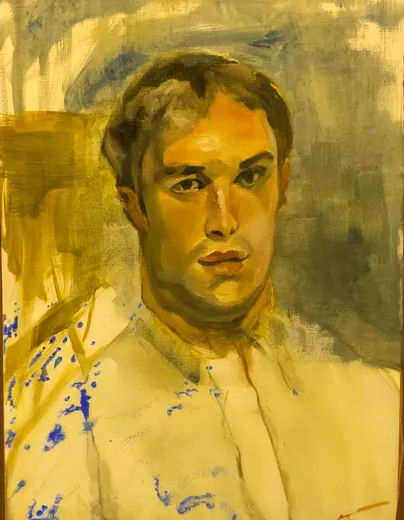
I left the shirt as bare paper.A model read a shirt into it. Code draws it in the model's numbers.

Each digit is its spot's value, from 0 for the darkest to 9 for the lightest, in the nearest of the painting's eight colours, read a patch at a time in the order the model lines them up. Point at the picture, or press it, to read the numbers.

The model readsa painting of

a 90%man 1%the 1%

One portrait, and everything two open models did with it on my laptop. A captioning model reads the painting and calls the bare paper a white shirt. An image model drafts that shirt. Code weaves it over the painting from the numbers the image model ran on. Every word, number and frame below comes from those runs.

Role
Artist
Creative Technologist
Models
BLIP, SDXL Inpainting
Compute
On-device
Rendering
Real-time Canvas 2D
Tools
Claude Code, Python, PyTorch, React

Paint

Before any model: strokes, values and one palette.

This is how I read the same picture as a painter. The strokes run along the form, the tones sit on a value scale, and every colour comes from one palette. Here each stroke is redrawn as a line of its own values, 0 for the darkest to 9 for the lightest, in the eight colours the painting is made of. The lines draw themselves darkest first, the way I block in a portrait.

Value, 0 darkest to 9 lightest

My palette, eight colours sampled from the paint

Cobalt, the machine's colour: outside my palette, and opposite its ochres on the colour wheel.

Reading

It reads the painting one word at a time.

BLIP, a captioning model, starts from “a painting of” and chooses each next word from a ranked list. Beam search keeps the sentence that scores best as a whole, so it took “in” at 21% over “with” at 23%, and “looking” at 9%. Then it gave a painting a camera, at 82%. I took its own second choice, “viewer” at 5%, before anything was drawn.

  1. a painting ofGiven to it
  2. a
    • a90%
    • man1%
    • the1%
    • an1%
    • young<1%
  3. man
    • man60%
    • young13%
    • painting4%
    • portrait3%
    • close2%
  4. in
    • with23%
    • in21%
    • is8%
    • wearing7%
    • looking5%
  5. a
    • a67%
    • white18%
    • an1%
    • front1%
    • yellow1%
  6. white
    • white62%
    • shirt10%
    • yellow3%
    • polo2%
    • baseball1%
  7. shirt
    • shirt88%
    • sweater1%
    • polo1%
    • collar1%
    • t1%
  8. looking
    • is13%
    • and9%
    • looking9%
    • with8%
    • looks7%
  9. at
    • at21%
    • to10%
    • off7%
    • into7%
    • away5%
  10. the
    • the68%
    • something16%
    • a5%
    • camera2%
    • his1%
  11. viewerMy edit
    • camera82%
    • viewer5%
    • side1%
    • right1%
    • left<1%

Readings it could have written

  • a young man wearing a white shirt and a brown hat
  • a man with a baseball bat in his hands
  • a man in a white shirt stares off into the distance

Temperature 0.6. Cooler than its own odds: it stays near its first choices, and the readings stay plausible. Three of the 8 readings it drew; I left out the ones that happened to name people.

Looking

When it wrote “shirt”, it was looking at bare paper.

Its vision side cuts the painting into 576 patches. For each word, the squares mark the patches whose attention raised that word's chance: attention weighted by its gradient, the method BLIP's authors use to show where words sit in a picture. “Man” finds the face, “shirt” lands on the collar and the empty paper below it, and its “camera” was his eyes.

My portrait, with the patches the captioner looked at for “shirt”

For “shirt” it looked at the collar and the bare paper below it. I never painted a shirt there.

576 patches, 24 by 24. A square's size is how much that patch's attention raised the chance of “shirt”, which it gave 88%.

Why a white shirt

It fills bare paper with what usually goes there, in the paper’s colour.

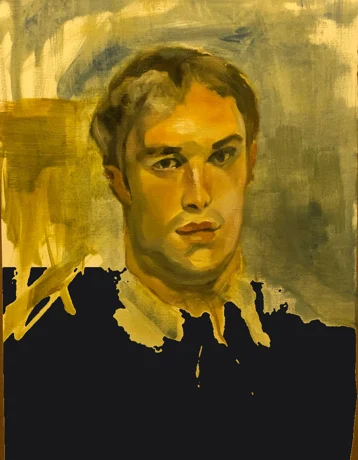
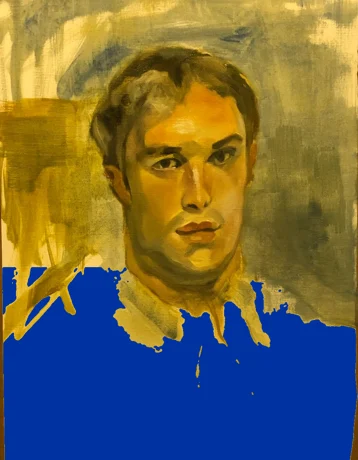
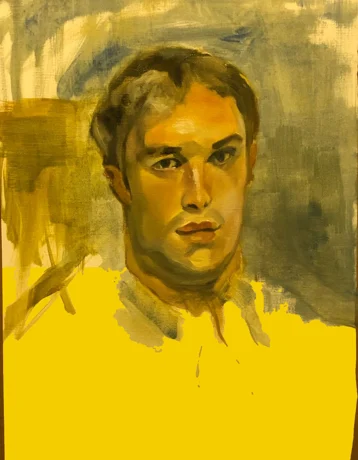
Nothing is painted below the collar, and under the studio light the paper photographs a warm yellow. So I changed one thing at a time and asked the same model again, from the same first words. Each test shows the picture it was given, what it read, and how likely each word was after “a man in a”.

  1. As I painted it: the picture the model was given.As I painted it“a man in a white shirt looking at the camera”white 62%
  2. The paper filled black: the picture the model was given.The paper filled black“a man in a black shirt and tie”black 53%white 1%
  3. The paper filled blue: the picture the model was given.The paper filled blue“a man in a blue shirt looking at the camera”blue 85%white <1%
  4. The paper filled yellow: the picture the model was given.The paper filled yellow“a man in a yellow shirt looking at the camera”yellow 83%white 3%
  5. The head alone, above the paper: the picture the model was given.The head alone, above the paper“a man in a suit and tie in front of a painting”suit 11%white 9%
  6. No picture, flat gray: the picture the model was given.No picture, flat gray“a man riding a surfboard on top of a wave”suit 11%white 5%
The colour is the paper’s.
Fill the paper black, blue or yellow and the shirt turns black, blue or yellow: 53%, 85% and 83%. My paper photographs a warm cream, but as the palest thing in the picture it reads as white, 62% to yellow’s 3%.
Below a face, it expects clothes.
Whatever the paper’s colour, the word after it is “shirt”, 51% to 88%. Crop the paper away and it still dresses him, in a suit and tie.
It isn’t the words alone.
With no picture, “white” follows “a man in a” only 5% of the time. The 62% comes from looking at the paper.
It has no word for unfinished.
Started from “an unfinished painting of”, it still writes “a young man in a white shirt”. It can’t read bare paper as bare.

Numbers

The image model gets numbers, not words.

Before the image model can use the reading, its own tokenizer breaks each word into pieces it learned from its training text and swaps them for IDs. These 13 numbers are all of the reading it ever sees, and the digits the shirt will be woven from.

  1. Lettersshirt</w>
  2. 41st mergeshirt</w>
  3. 71st mergeshirt</w>
  4. 1,445th mergeshirt</w>
  5. 2,012th mergeshirt</w>
  6. Token ID2523

CLIP's tokenizer starts from letters and keeps joining the pair it learned earliest, until “shirt” is one piece it knows. The rank is where the pair sits among the 48,894 merges it learned from its training text; </w> marks the end of a word. The captioner spelled the same word as 3797 in its own vocabulary: the two models do not share numbers.

Draft

It drafts the shirt out of noise, large shapes first.

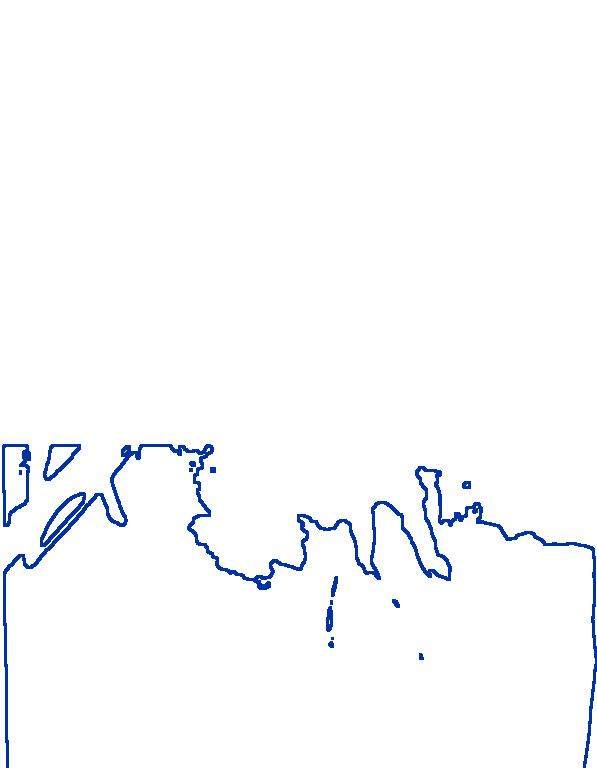
The image model gets the 13 IDs and the painting with the bare paper masked. Over 29 steps it guesses the finished picture, coarse first and detail last. I keep its draft as a draft: it decides where the folds and shadows go, and none of its paint reaches the canvas.

the image model drafting the shirt, step 1 of 29
Step 1 of 29

Prompt, from its own reading: a man in a white shirt looking at the viewer. Each frame is its guess of the finished picture at that step. Outside the outline the painting is kept as I left it.

Every draft it made, one per seed

Another draft of the shirtAnother draft of the shirt

Code

Code weaves the shirt from those numbers.

Over my painting, code redraws the shirt in the 13 IDs. Darker in the draft means a heavier digit, and each digit lands at the step the model settled its spot. Switch between my painting, the model's draft and the code, and scrub through the steps.

The shirt is woven from the 13 token IDs the image model received. Darker in the draft means a heavier digit, and each digit lands at the step the model settled its spot. My sketched lines stay on top.

320308653932078653032015792523131253651815061

Research

Every drawing stands on how the models work.

Before this, I studied how AI gets pictured and drew the mechanisms inside models in code. Each source below is a rule in how this painting is drawn.

Justin Jay Wang, OpenAI and Cursor

Code as the medium

His graphics are rule sets written in code, each one built from what a system does. The drawings here are rule sets too: one for where a digit goes and how heavy it is, one for how large an attention square grows, one for when a merge lights up.

Designing with code
Better Images of AI, since 2021

Show the machine as it is

Stock images of AI are robots and glowing brains, which hide what the systems do and who makes them. So the model's part is never disguised as paint. It shows as its own material, with a seam you can see.

Better Images of AI
Selvaraju et al. 2017, Darcet et al. 2024

Where a model looks

Raw attention mostly lands on a few background patches whatever the word, the registers vision transformers grow. Weighting it by the gradient of the word's probability keeps only the looks that changed the word.

Grad-CAM
Model Studies, my first study

From toy models to real ones

I first drew these mechanisms with small models I wrote for the page: a tokenizer trained on one page of text, a trigram sampler, rule-based attention heads, a linear denoiser. Here the same four are the real models' own numbers, on one painting.

The first study

In the interface

What this changes in a creative tool.

I design AI products. Finishing my own painting with a model is the clearest way I've found to feel where its help should stop and how to show it.

Show the reading first

The model acts on its words, not on my intent. It gave my painting a camera; because its reading and its second choices were in front of me, I could swap in “viewer” before it drew a thing.

Keep the author's marks on top

The code layer goes under my sketched lines, never over them. An AI's contribution should build around what the author made, not paint it out.

Make the seam visible

A material that can't pass for paint shows exactly where the machine worked. Provenance is designed into the picture instead of a label beside it.

Treat the output as a draft

The model's draft decides light and form, and the final layer is a separate, inspectable choice. People can keep the guidance and refuse the paint.

Method

How it was made.

Brushwork

The direction of the strokes comes from the structure tensor of the paint's tones, smoothed so it follows the run of the strokes and the form rather than the weave. Lines are evenly spaced streamlines, closer where darker; each digit is its spot's value, in the nearest of the eight colours, darkest lines drawn first.

Palette

Eight colours found by clustering the painted areas of a photograph of the painting, the bare paper left out, sorted dark to light. The photograph was taken under warm light, so the palette leans ochre.

Reading

BLIP image captioning, large, with beam search over five beams from “a painting of”. My one correction replaces its last word; the alternatives are its probabilities at each step of the corrected sentence. The other readings are plain temperature sampling, 8 at each temperature.

Looking

Cross-attention from the step that wrote each word to the 24 by 24 patches, times its positive gradient with respect to that word's log probability, averaged over the 12 heads and 12 layers of the text decoder.

Why a white shirt

The same captioner, from the same first words. The bare paper, the mask the shirt is drawn in, filled flat in one colour with the painted parts and my sketched lines left as they are; the head cropped above it; or a flat gray picture. The odds of each word come from one pass over “a painting of a man in a”, and the readings from the same beam search as above.

Numbers

CLIP's byte-pair encoding replayed from its merge table of 48,894 merges: start from letters and join the pair it learned earliest until none applies. The IDs are the ones the image model received.

Draft

Stable Diffusion XL inpainting 0.1 at about one megapixel, 29 Euler steps at strength 0.99, guidance 7, two seeds; the step previews use the tiny SDXL autoencoder. A spot counts as settled at the step after which the guess stays within 4% of its final value.

The numbers in the film

The painting becomes characters the way an ASCII render does (three.js has one built in), but each character is a number: its spot's value from 0 to 9, stretched across the painting's own range, in the nearest of its eight colours, larger and heavier where darker. It turns over a patch at a time, row by row, the order the vision encoder lines its 576 patches up. The bare paper stays open for the shirt.

Digits

A grid of cells over the open paper, every other row shifted half a cell. Paper-light stays empty, darker gets a heavier digit, and each digit lands at the step its spot settled.

On the laptop

Everything ran on a MacBook Pro with an M1 Pro, through PyTorch on the Apple GPU, with open models from Hugging Face. The painting never left the laptop.